With Spring time in full bloom, it is time for the yearly cleaning. While dusting off your cupboards and vacuuming the closets is on most peoples to-do list, cleaning the gadgets they use everyday often doesn't make the cut. Today Tech2U will go over basic cleaning techniques to keep your most used gadgets bacteria free and keep there appearance like new.
Wiping your phone screen off with your t-shirt may get some smudges off, but it doesn't prevent or kill any bacteria that has built up. Cell phones can contain upwards of 8-10x more bacteria than your average toilet, and you don't put your toilet up to your face everyday. Some basic tips to keep your cell phone clean is to:
Power down your device
Remove any case or protective outer covering
Try to leave your screen protector on, unless there is visible debris stuck beneath it
Cook up a solution of equal parts distilled water and isopropyl alcohol, this will destroy any bacteria
Wipe down your screen with a microfiber cloth and dampen it with the solution
To get the harder debris, use a Q-tip or toothbrush to scrape it out of the crevices
Also, be sure to avoid Clorox wipes or Windex. The ammonia in these products can destroy the protective coating on your screen. Paper towels should also be avoided as they can scratch and leave streaks on the screen. If you don't have any alcohol spray or microfiber cloths handy you can check out Wireless Wipes. They are fast drying and non-corrosive with AMAZING scents to choose from. They run $2.50 for a 12 wipes or $8 for a 3 pack and can easily be taken with you on the go to clean tablets, laptops, and cell phones.
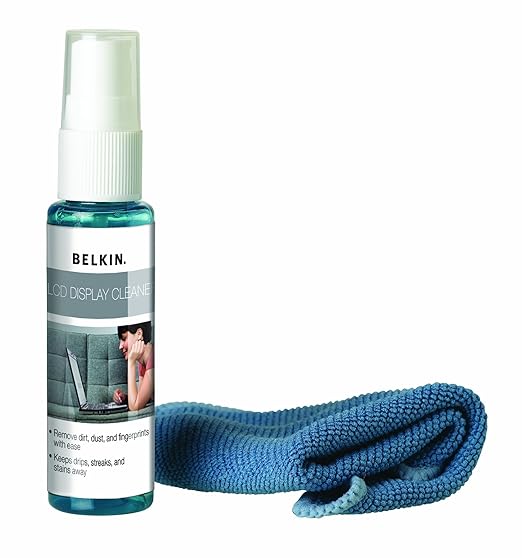
Belkin Screen Cleaning Kit
For your laptops and keyboards the same tips apply about avoiding Clorox wipes and corrosive cleaners. A good alcohol solution we recommend is the Belkin Screen Cleaning Kit that goes for $12 on Amazon. The kit comes with a proprietary solution and a microfiber cloth. The liquid is thicker which makes it less likely to sneak into any nooks or crannies of your keyboard. Use a damp microfiber cloth or q-tips to dislodge stuck food or dirt from between keys or out of small button or vent spaces. You can also use canned air to blow debris out from vents and around keys but be careful not to blow dirt into any air vents. For other stuck on goo, use a q-tip with the alcohol solution which will help moisture evaporate more quickly from the surface and lift up tough stains.
Earbuds and headphones are also a great thing to clean out this spring. Earbuds have a nasty tendency to attract earwax, but luckily they are easy and quick to clean. Grab your damp microfiber cloth from before and clean the buds with warm soapy water. If they have any foam or cloth coverings, remove and clean them as well. If there is any trapped dirt and grime in the cracks, use a Q-tip or toothbrush as before to scrape out the hard to reach places.
Be sure to like Tech2U on Facebook and Follow us on Twitter for more updates and articles like this one!Video Transcript:
Jeff: I'm worried! I'm worried about how dirty this thing is!
Ryan: Don't get that thing near me!
Jeff: I'm telling you! When I heard Ryan Eldridge with Tech 2 U tell me that my cell phone is 10 times more dirty than a toilet at home, ya know, I don't know what to do with that phone! I've never cleaned it, I've never cleaned...
Ryan: And look at that thing! Ooh! You don't want to see that.
Jeff: ...it's so smudgy and dirty, and it's been dropped in some really nasty places, and I've never cleaned it, and this is the time to do that. We're in spring, it's all about spring cleaning, right?
Ryan: Yes!
Jeff: And with your tech gadgets that means some extra care.
Ryan: So we're all used to the familiar, "Oh now it's clean, that's perfect. Let's hand that to the kids and let them play with it for a little while". So here's the thing about cleaning your cell phone. It's actually a lot easier than a lot of people think. Just power it down, get a little solution of about 50% alcohol, 50% water, and a microfiber cloth. Spray on to the cloth, wipe down your phone, you're pretty much clean. If you've got really deep down grungy stuff like in the buttons and in some of the speakers, you can use some Q-tips and really scrub that stuff out. Or a soft bristled toothbrush, like this cool Iron Man toothbrush and you can kinda scrub that out.
Jeff: Well, let's talk about why that's important and what kind of stuff gets on your phone.
Ryan: Well, here's something interesting. Let's say you don't have any...
Jeff: Do I wanna know?
Ryan: Let's say you don't have all of this stuff, right, and you just wanna just do something quick and easy? You can use something called Wireless Wipes. Now the creator of Wireless Wipes, he got a staph infection on his face! On his face from his cell phone!
Jeff: From a cell phone?
Ryan: Yeah! So the Wireless Wipes is basically the same thing here, just a quick easy thing to do. You can get them, I think it's 12 for $3. Buy them at Amazon, and you can get a three pack for $8.
Jeff: Where was he dropping his phone?
Ryan: I don't know! But a staph infection on your face? That's crazy! No!
Jeff: That's terrible, and for my job that's an awful thing to think about. It's all about the face, right? So I'm going to talk to people on speakerphone from now on.
Ryan: Well if it really freaks you out Jeff, you can get something like this. It looks like a little tanning bed for your phone. This is called the PhoneSoap, or the, yeah, the PhoneSoap 2.0, and you put your phone inside it and close it up, and it'll charge your phone and it's got a UV light, and it'll clean your phone for you while you're sleeping. So if you're really freaked out, that's a good way to go.
Jeff: Does it come with little miniature goggles for my phone so that it's eyes don't get damaged by the rays?
Ryan: Here, we could make them for you!
Jeff: There ya go! This really is like a tanning bed for the phone. This is so cool. Who makes this?
Ryan: It's just PhoneSoap. You can go to phonesoap.com to pick that up. It's about $60.
Jeff: So this charges the phone.
Ryan: It charges the phone, and the UV light sanitizes it, so you don't have to worry about your staph infection. Huh?
Jeff: That's a great combo right there.
Ryan: So let's say you're going to clean your keyboard. We are kinda weird about keyboards in America. We eat over our keyboards while we're doing stuff...
Jeff: Drop food? Yes.
Ryan: Oh that's terrible!
Jeff: The cat walks over it.
Ryan: If you have a little bit of spray, like that canned air spray, you can spray it on the keyboard. If you don't, again use the same solution with the alcohol and the water, put it on the microfiber cloth, wipe it down. Use a toothbrush or a Q-tip to get really in the nooks and crannies, and you can kinda clean that up.
Jeff: Ya know what? I hate cleaning, but I will do it for my gadgets, because we all love our gadgets. Ryan Eldridge with Tech 2 U. Thank you for coming in. Some great advice. We'll be right back after the break.

 Belkin Screen Cleaning Kit
For your laptops and keyboards the same tips apply about avoiding Clorox wipes and corrosive cleaners. A good alcohol solution we recommend is the Belkin Screen Cleaning Kit that goes for $12 on Amazon. The kit comes with a proprietary solution and a microfiber cloth. The liquid is thicker which makes it less likely to sneak into any nooks or crannies of your keyboard. Use a damp microfiber cloth or q-tips to dislodge stuck food or dirt from between keys or out of small button or vent spaces. You can also use canned air to blow debris out from vents and around keys but be careful not to blow dirt into any air vents. For other stuck on goo, use a q-tip with the alcohol solution which will help moisture evaporate more quickly from the surface and lift up tough stains.
Earbuds and headphones are also a great thing to clean out this spring. Earbuds have a nasty tendency to attract earwax, but luckily they are easy and quick to clean. Grab your damp microfiber cloth from before and clean the buds with warm soapy water. If they have any foam or cloth coverings, remove and clean them as well. If there is any trapped dirt and grime in the cracks, use a Q-tip or toothbrush as before to scrape out the hard to reach places.
Be sure to like Tech2U on Facebook and Follow us on Twitter for more updates and articles like this one!
Video Transcript:
Jeff: I'm worried! I'm worried about how dirty this thing is!
Ryan: Don't get that thing near me!
Jeff: I'm telling you! When I heard Ryan Eldridge with Tech 2 U tell me that my cell phone is 10 times more dirty than a toilet at home, ya know, I don't know what to do with that phone! I've never cleaned it, I've never cleaned...
Ryan: And look at that thing! Ooh! You don't want to see that.
Jeff: ...it's so smudgy and dirty, and it's been dropped in some really nasty places, and I've never cleaned it, and this is the time to do that. We're in spring, it's all about spring cleaning, right?
Ryan: Yes!
Jeff: And with your tech gadgets that means some extra care.
Ryan: So we're all used to the familiar, "Oh now it's clean, that's perfect. Let's hand that to the kids and let them play with it for a little while". So here's the thing about cleaning your cell phone. It's actually a lot easier than a lot of people think. Just power it down, get a little solution of about 50% alcohol, 50% water, and a microfiber cloth. Spray on to the cloth, wipe down your phone, you're pretty much clean. If you've got really deep down grungy stuff like in the buttons and in some of the speakers, you can use some Q-tips and really scrub that stuff out. Or a soft bristled toothbrush, like this cool Iron Man toothbrush and you can kinda scrub that out.
Jeff: Well, let's talk about why that's important and what kind of stuff gets on your phone.
Ryan: Well, here's something interesting. Let's say you don't have any...
Jeff: Do I wanna know?
Ryan: Let's say you don't have all of this stuff, right, and you just wanna just do something quick and easy? You can use something called Wireless Wipes. Now the creator of Wireless Wipes, he got a staph infection on his face! On his face from his cell phone!
Jeff: From a cell phone?
Ryan: Yeah! So the Wireless Wipes is basically the same thing here, just a quick easy thing to do. You can get them, I think it's 12 for $3. Buy them at Amazon, and you can get a three pack for $8.
Jeff: Where was he dropping his phone?
Ryan: I don't know! But a staph infection on your face? That's crazy! No!
Jeff: That's terrible, and for my job that's an awful thing to think about. It's all about the face, right? So I'm going to talk to people on speakerphone from now on.
Ryan: Well if it really freaks you out Jeff, you can get something like this. It looks like a little tanning bed for your phone. This is called the PhoneSoap, or the, yeah, the PhoneSoap 2.0, and you put your phone inside it and close it up, and it'll charge your phone and it's got a UV light, and it'll clean your phone for you while you're sleeping. So if you're really freaked out, that's a good way to go.
Jeff: Does it come with little miniature goggles for my phone so that it's eyes don't get damaged by the rays?
Ryan: Here, we could make them for you!
Jeff: There ya go! This really is like a tanning bed for the phone. This is so cool. Who makes this?
Ryan: It's just PhoneSoap. You can go to phonesoap.com to pick that up. It's about $60.
Jeff: So this charges the phone.
Ryan: It charges the phone, and the UV light sanitizes it, so you don't have to worry about your staph infection. Huh?
Jeff: That's a great combo right there.
Ryan: So let's say you're going to clean your keyboard. We are kinda weird about keyboards in America. We eat over our keyboards while we're doing stuff...
Jeff: Drop food? Yes.
Ryan: Oh that's terrible!
Jeff: The cat walks over it.
Ryan: If you have a little bit of spray, like that canned air spray, you can spray it on the keyboard. If you don't, again use the same solution with the alcohol and the water, put it on the microfiber cloth, wipe it down. Use a toothbrush or a Q-tip to get really in the nooks and crannies, and you can kinda clean that up.
Jeff: Ya know what? I hate cleaning, but I will do it for my gadgets, because we all love our gadgets. Ryan Eldridge with Tech 2 U. Thank you for coming in. Some great advice. We'll be right back after the break.
Belkin Screen Cleaning Kit
For your laptops and keyboards the same tips apply about avoiding Clorox wipes and corrosive cleaners. A good alcohol solution we recommend is the Belkin Screen Cleaning Kit that goes for $12 on Amazon. The kit comes with a proprietary solution and a microfiber cloth. The liquid is thicker which makes it less likely to sneak into any nooks or crannies of your keyboard. Use a damp microfiber cloth or q-tips to dislodge stuck food or dirt from between keys or out of small button or vent spaces. You can also use canned air to blow debris out from vents and around keys but be careful not to blow dirt into any air vents. For other stuck on goo, use a q-tip with the alcohol solution which will help moisture evaporate more quickly from the surface and lift up tough stains.
Earbuds and headphones are also a great thing to clean out this spring. Earbuds have a nasty tendency to attract earwax, but luckily they are easy and quick to clean. Grab your damp microfiber cloth from before and clean the buds with warm soapy water. If they have any foam or cloth coverings, remove and clean them as well. If there is any trapped dirt and grime in the cracks, use a Q-tip or toothbrush as before to scrape out the hard to reach places.
Be sure to like Tech2U on Facebook and Follow us on Twitter for more updates and articles like this one!
Video Transcript:
Jeff: I'm worried! I'm worried about how dirty this thing is!
Ryan: Don't get that thing near me!
Jeff: I'm telling you! When I heard Ryan Eldridge with Tech 2 U tell me that my cell phone is 10 times more dirty than a toilet at home, ya know, I don't know what to do with that phone! I've never cleaned it, I've never cleaned...
Ryan: And look at that thing! Ooh! You don't want to see that.
Jeff: ...it's so smudgy and dirty, and it's been dropped in some really nasty places, and I've never cleaned it, and this is the time to do that. We're in spring, it's all about spring cleaning, right?
Ryan: Yes!
Jeff: And with your tech gadgets that means some extra care.
Ryan: So we're all used to the familiar, "Oh now it's clean, that's perfect. Let's hand that to the kids and let them play with it for a little while". So here's the thing about cleaning your cell phone. It's actually a lot easier than a lot of people think. Just power it down, get a little solution of about 50% alcohol, 50% water, and a microfiber cloth. Spray on to the cloth, wipe down your phone, you're pretty much clean. If you've got really deep down grungy stuff like in the buttons and in some of the speakers, you can use some Q-tips and really scrub that stuff out. Or a soft bristled toothbrush, like this cool Iron Man toothbrush and you can kinda scrub that out.
Jeff: Well, let's talk about why that's important and what kind of stuff gets on your phone.
Ryan: Well, here's something interesting. Let's say you don't have any...
Jeff: Do I wanna know?
Ryan: Let's say you don't have all of this stuff, right, and you just wanna just do something quick and easy? You can use something called Wireless Wipes. Now the creator of Wireless Wipes, he got a staph infection on his face! On his face from his cell phone!
Jeff: From a cell phone?
Ryan: Yeah! So the Wireless Wipes is basically the same thing here, just a quick easy thing to do. You can get them, I think it's 12 for $3. Buy them at Amazon, and you can get a three pack for $8.
Jeff: Where was he dropping his phone?
Ryan: I don't know! But a staph infection on your face? That's crazy! No!
Jeff: That's terrible, and for my job that's an awful thing to think about. It's all about the face, right? So I'm going to talk to people on speakerphone from now on.
Ryan: Well if it really freaks you out Jeff, you can get something like this. It looks like a little tanning bed for your phone. This is called the PhoneSoap, or the, yeah, the PhoneSoap 2.0, and you put your phone inside it and close it up, and it'll charge your phone and it's got a UV light, and it'll clean your phone for you while you're sleeping. So if you're really freaked out, that's a good way to go.
Jeff: Does it come with little miniature goggles for my phone so that it's eyes don't get damaged by the rays?
Ryan: Here, we could make them for you!
Jeff: There ya go! This really is like a tanning bed for the phone. This is so cool. Who makes this?
Ryan: It's just PhoneSoap. You can go to phonesoap.com to pick that up. It's about $60.
Jeff: So this charges the phone.
Ryan: It charges the phone, and the UV light sanitizes it, so you don't have to worry about your staph infection. Huh?
Jeff: That's a great combo right there.
Ryan: So let's say you're going to clean your keyboard. We are kinda weird about keyboards in America. We eat over our keyboards while we're doing stuff...
Jeff: Drop food? Yes.
Ryan: Oh that's terrible!
Jeff: The cat walks over it.
Ryan: If you have a little bit of spray, like that canned air spray, you can spray it on the keyboard. If you don't, again use the same solution with the alcohol and the water, put it on the microfiber cloth, wipe it down. Use a toothbrush or a Q-tip to get really in the nooks and crannies, and you can kinda clean that up.
Jeff: Ya know what? I hate cleaning, but I will do it for my gadgets, because we all love our gadgets. Ryan Eldridge with Tech 2 U. Thank you for coming in. Some great advice. We'll be right back after the break.